Submit Requests
During a live Session, use the Session Application to request assistance or communicate with the Host. Select an option from the Raise Hand menu to ask for a pause, speak to participants, or replay audio from the recording. For technical issues, click the Help Bell to alert Technical Support, who coordinates with the Host to resolve the issue in real-time.
Make a Request
To make a request, select an option from the Raise Hand menu to notify the Host. You can ask to pause the Session, speak to participants, or play back audio from the live recording.
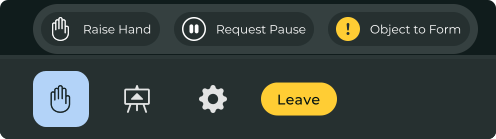
| Menu Option | Request to |
|---|---|
| Raise Hand | Speak in the Session |
| Request Pause | Take a short break |
| Object to Form | Object to form (attorney) |
Get Immediate Technical Support
Request immediate, real-time technical assistance anytime during a live Session. When you click the Help Bell, our Technical Support team collaborates with the Session Host to promptly address and resolve technical issues.

- On the Session Toolbar, click the Bell icon.
The Request Live Help confirmation window opens.
- Click Request Help.